Welcome new texting volunteers!
The Fairfax GOP is reaching out now to over 70,000 Fairfax County Republicans who have voted early in recent elections, and we need your help to text them about the Redistricting Ballot Referendum!
Your time as a Volunteer Peer-to-Peer (P2P) Texter enables our messages to reach tens of thousands of Fairfax voters, motivating them to get out to VOTE NO!
To join the Fairfax GOP's texting army:
If you do not yet have the SwipeRed app, download to your phone:
Go to either the GooglePlay Store or Apple App Store, search for "Swipe Red" and look for this logo:

Download the app and move on to the steps to create your account.
Steps to create your texting account:
1. Create a password, and save it/write it down because we cannot retrieve it for you.
2. Make an account using your full name and email. If you have an unusual first name, it’s ok to give a fake first name, as your first name is used in the text greeting. Just let us know that you have used an alias. When you send a P2P text, the message will display only your first name.
3. OPTIONAL: You can choose to sync your personal contacts but it is not necessary. Selecting contacts can be time consuming, so you can always go back and do that later.
4. Select the campaign. At the bottom of your phone screen, touch CAMPAIGNS, scroll down to Virginia, and select Fairfax County Republican Committee, and hit JOIN in the upper right corner.
*** IMPORTANT! Texting hours are 9:00 AM - 8:00 PM, M-F, 10:00 AM - 6:00 PM on Saturdays, and 12:00 PM - 5:00 PM on Sundays. EST
To start texting:
-
If you're not already in the SwipeRed app, login using your saved password and email.
-
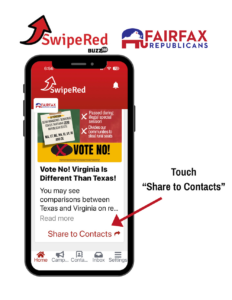
You should see a message from the Fairfax GOP. Scroll down and click on “Share to Contacts”.
-
Click on the red button in the middle "ASSIGN ME 5 CONTACTS".
-
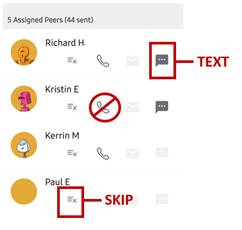
You will see a list of five contacts. Click on the three dots to TEXT. The text message then appears, scroll to the bottom and hit “Send Message”.
DO NOT CLICK ON THE PHONE SYMBOL!
If no text symbol is available, that contact cannot be texted. Click the three lines with an X to SKIP the contact.
-
Repeat! Once you've either texted or skipped the first 5 contacts, click on “Assign Me 5 Contacts” again, and you are on your way to 200-300 texts per hour!
-
The current message is set up for a large audience of voters, but if SwipeRed won’t give you new contacts when you click "ASSIGN ME 5 CONTACTS", it means that all of the targeted voters are exhausted and another message will be ready shortly.